When you position your hands at a keyboard as discussed in an earlier article referring to ‘typing with clawed hands’, bad positioning of the wrist can lead to overuse injuries caused by strain in your forearm extensor muscles.
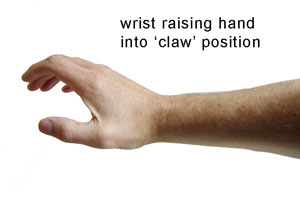 The common position for hands hovering above a keyboard is as shown on the right, which I refer to as the ‘claw’. This position elevates the tension in the aforementioned extensor muscles, causing them to become fatigued over prolonged periods of time. Typing whilst the hand/wrists are in this position (another common posture mistake) will further increase the muscle and tendon stresses making the situation worse.
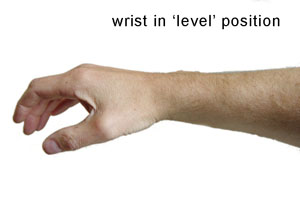
What may not be so obvious is that moving the wrists into a more neutral ‘level’ position (see image) can still create enough continual tension in the forearm extensor muscles. This is not always apparent unless, like me, you already have a bad RSI condition and can notice the pain in already injured muscles.
This is a much better position than the ‘claw’, and the forearm extensors are far less tense. They are however still in tension which may lead to forearm extensor fatigue when held in this manner for long periods of time eg 6-8 hours a day hovering your hands over a keyboard at work.
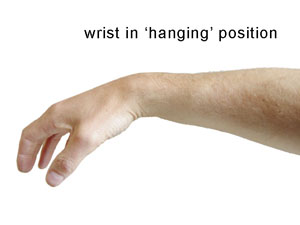
The final image on the right shows a ‘hanging’ wrist position which, if adopted, places minimal stress on the forearm extensors, (they should in fact be relaxed in this position), and is a good posture to aim for when typing. You can then utilise the weight of your hands and fingers to type, lifting the arms from the shoulders and elbows instead of placing the burden on the forearm extensors and associated tendons.
You don’t even need to be at a keyboard to try out these different wrist angles. Just hold your hands in these positions for 2 minutes and observe the different tensions in the forearm extensor muscles. Start to imagine what it is like for your body to hold this tension for up to 8 hours a day at a computer, and ask yourself whether it may be more beneficial if you changed your posture to one that has far less muscle/tendon tension in it.
Note: In order to successfully utilise the ‘hanging’ wrist position you will most likely need an ergonomic computer set up with a drop down keyboard tray, perhaps even an adjustable position keyboard tray.
Related articles on forearm extensor muscles :
Forearm Extensor Muscle Overuse and RSI
Does forearm extensor trigger point massage offerer a potential cure for RSI?
Rate this post! [ratings]
4 replies on “Forearm extensor muscles, wrist position and RSI”
really helpful info , i recently have been try to catch up with my computer work ,spending 5hrs on computer daily for the last month ,i now have the above symptoms. NHS WORKER
Hi Lynn,
thanks for the positive feedback. Sounds like you have caught it early. Hope you manage to make the adjustments that help reduce your exposure to RSI. There are plenty of pages with other info here. The ‘RSI – What to do Part 1‘ may be a good place to start. Also check out the FAQ which has a lot of info.
Can’t be an easy job for you right now working in the NHS with all the govt. cutbacks.
Alan
I. Am a handyman and have these symptoms. Is it posible my line of work is contributing to this.
Hard to say for sure, but there is a lot of repetitive motions involved in some handy work. Computers are one certain example of repetitive stress injuries, but lots of other example exist including musicians, sports people, and builders. Any motion that is repetitive in nature has the potential to cause injury if done often enough, with insufficient rest or variation in tasks. You would really need to analyse the injury you have,and what you do. You should consult someone with experience of repetitive injuries in your line of work, mine experience is 100% based on computer use.
Alan